
Self Assembly and Molecular Computing
Self Organizing Sensor System
Introduction
"A cellular automaton (CA) is a collection of "colored" cells on a grid of specified shape that evolves through a number of discrete time steps according to a set of local rules, i.e., rules based only on the states of neighboring cells. The rules are then applied iteratively for as many time steps as desired. von Neumann was one of the first to consider such a model, and incorporated a cellular model into his universal constructor."
-Wolfram Mathworld-
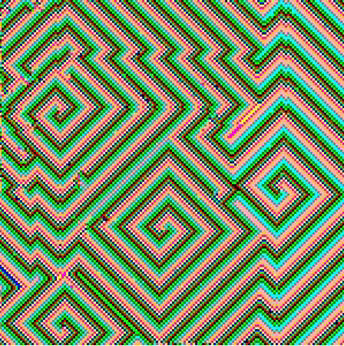
Figure 1. State of a Cyclic Cellular Automaton after 50 steps starting in a random configuration
The neighborhood of a cell in most CAs is the von Neumann neighborhood consisting of the four cells North, South, East, and West of the given cell. Assume a cell at location (i,j) is in state s, an integer from 0 to k-1. Each cell x checks its von Neumann neighborhood Nx. If any cell in Nx is in state (s+1) mod k, then x changes its state to (s+1) mod k; otherwise, x stays in state s.
For more information, please check Wolfram Mathworld or Wikipedia.
Thanks to Professor David Hiebeler at the University of Maine, Department of Mathematics for making his java code available. (See his home page for many interesting experiments with cellular automata.)
Experiments
We adapted the CCA to the sensor-network application and performed various experiments. Here are some java applets that you can play with. Each applet represents a given sensor field with color coded cell states.
Note : We strongly recommend installing the most recent version of Java (version 1.6) to view all applets properly.
Implementation in Z2
Implementation in R2
- Greenberg-Hastings Model Displays all sensors.
- Greenberg-Hastings Model Displays (black) wake sensors only.
- Planting Seeds : Single-Phase (Plant up to 7 seeds anywhere in the sensor field.)
- Planting Seeds : Bi-Phase (Plant two distinguishable seeds anywhere in the sensor field.) Displays (black) wake sensors only.
- Planting Seeds : Bi-Phase (Plant two distinguishable seeds anywhere in the sensor field.) Displays all sensors.
- Planting Seeds : Bi-Phase (Specify a link-failure probability and plant two seeds.) Displays all sensors.
- Planting Seeds : Bi-Phase with an obstacle (See how waves propagate around an obstacle.)