A Brief Introduction To Audio Processing In Matlab
2007-01-19 [email protected]
Contents
Reading an audio file
[d sr] = wavread('freebird.wav');
size(d)
ans =
      441001           2
d is just a matrix containing the audio samples from the wav file. Each column contains a different channel (for stereo data column 1 is left, column 2 is right). Each sample is a floating point number between -1 and 1. sr is the sampling rate.
Prof. Ellis has written an mp3read function which does the same thing for mp3 files. You can download it from: http://www.ee.columbia.edu/~dpwe/resources/matlab/mp3read.html
So we have a stereo file, whose length in seconds is:
length(d)/sr
ans =
           10
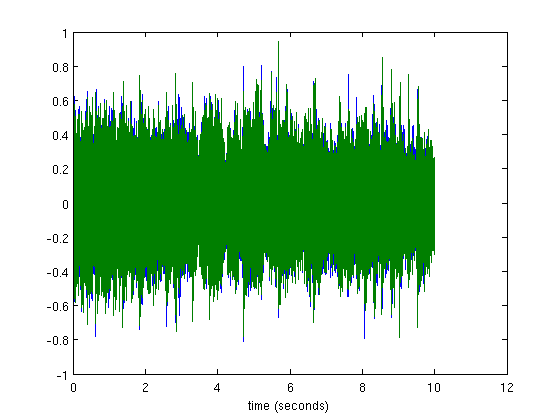
plot() will plot the waveform. The blue samples are the left channel, the green samples are from the right channel
t = linspace(0, length(d)/sr, length(d))';
plot(t, d)
xlabel('time (seconds)');
Playing audio in Matlab
You can play the audio using the sound() and soundsc() commands. Be sure to pass it the correct sampling rate.
soundsc(d, sr)
Since we can access the samples like any other Matlab matrix, we can easily do things like playing it backwards:
soundsc(d(end:-1:1,:), sr);
or only the first 5 seconds:
soundsc(d(1:5*sr, :), sr);
Luckilly this song was mixed in such a way that the vocals are mixed (roughly) equally between the left and right channels, which the other instruments are not. So by subtracting the right channel from the left, we can cancel out the vocals:
d_novocals = d(:,1) - d(:,2);
soundsc(d_novocals, sr);
Audio capabilities are not available on this machine.
Writing an audio file
wavwrite(d_novocals, sr, 'freebird_novocals.wav');
Note that wavwrite will complain if any samples of d_novocals are outside the range [-1, 1] since the samples will be converted to fixed point 16 bit samples which have a limited dynamic range. If any samples have amplitudes bigger than 1, they will be clipped to 1 and you will end up with some nasty distortion (this is why you might want to use soundsc() instead of sound() to play sounds in Matlab).
Other operations
Mixing signals is just addition:
d_mono = sum(d,2)/2;
d_plus_sin = d_mono + sin(2*pi*300*t);
We can change the sampling rate with resample:
d_22kHz = resample(d, 1, 2);
d_22kHz has half as many samples as the original sound:
size(d_22kHz)
ans =
      220501           2
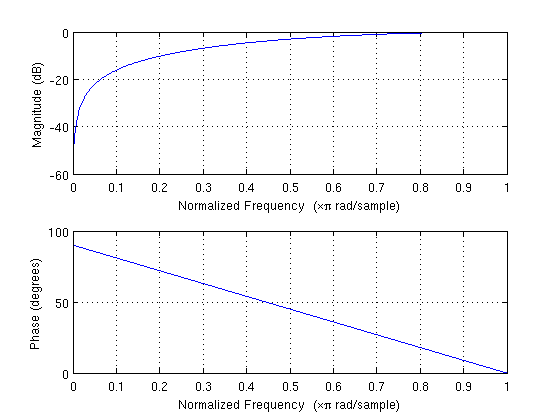
We can apply a simple two tap high pass filter with the following impulse reponse

using the filter() command:
HPF = [0.5 -0.5];
d_hp = filter(HPF, 1, d_22kHz);
freqz() plots the frequency response:
freqz(HPF, 1);
We can make a simple reverb effect by summing the original sound with a version delayed by 100ms:
reverb = [1 zeros(1, .1*22050) 1];
d_reverb = filter(reverb, 1, d_22kHz);
The impulse response consists of two impulses, one at t = 0 and one at t = 100ms:
stem(linspace(0, length(reverb)/22050, length(reverb)), reverb)
xlabel('time (seconds)')
